Exnova Funding Guide 2026: How to Deposit Money Safely and Quickly

In this guide, you’ll learn how to deposit money on Exnova, explore the available funding options, and understand key details like fees and processing times so you can add funds safely and begin trading with confidence.

Deposit Money on Exnova — A Complete Funding Guide
Funding your Exnova account is one of the first real steps toward live trading. This guide walks you through every part of the deposit process — from choosing a payment method to confirming your balance — so you can get started without confusion or delays.
What Is Exnova?
Exnova is a binary options trading platform built for traders of all experience levels. It lets you speculate on price movements across a broad range of assets — currencies, stocks, commodities, and crypto — using a simple up/down prediction model over short timeframes.
Before you can trade with real money, your account needs to be funded. The good news: the deposit process is quick, and most transactions are processed almost instantly.
Before You Deposit — Quick Checklist
Make sure you have these ready before starting:
✅ An active Exnova account ✅ A verified email address ✅ A supported payment method ✅ Met the minimum deposit amount ✅ A stable internet connection
👉 No account yet? Sign up here: Sign up now
Supported Deposit Methods on Exnova
Exnova accepts a variety of payment options depending on your country and region:
💳 Bank Cards Visa and Mastercard debit or credit cards are accepted. Transactions are processed almost instantly in most cases.
📱 E-Wallets Options like Skrill, Neteller, and Perfect Money offer fast transfers with minimal friction. Popular among traders who prefer not to use banking cards directly.
₿ Cryptocurrency: Bitcoin, Ethereum, USDT, and other supported coins can be used to deposit. Processing depends on blockchain confirmation times, usually between 10 to 30 minutes.
🏦 Local Payment Systems Depending on your region, Exnova may support local bank transfers or regional payment gateways. Check availability based on your country during the deposit process.
Minimum Deposit Requirements
Exnova keeps its entry barrier low, making it accessible for beginners and small-budget traders.
- Minimum deposit: around $10
- Recommended starting amount: $50 – $100
This allows users to test the platform before committing larger capital.
Deposit Fees on Exnova
One of the biggest advantages of Exnova is its cost structure.
- Deposit fees: 0% (no platform charges)
- Third-party fees may apply depending on your payment provider
This means the full amount you deposit is typically credited to your trading account.
Deposit Processing Time
Processing speed depends on the payment method you choose, but most options are very fast.
Typical deposit times:
- Bank cards: Instant
- E-wallets: Instant
- Cryptocurrencies: 5–60 minutes
- Bank transfers: Up to a few hours (sometimes 1–3 business days)
In most cases, your account balance is updated almost immediately after completing the transaction.
How to Deposit Money on Exnova - Step-by-Step
Step 1: Access the Exnova Website
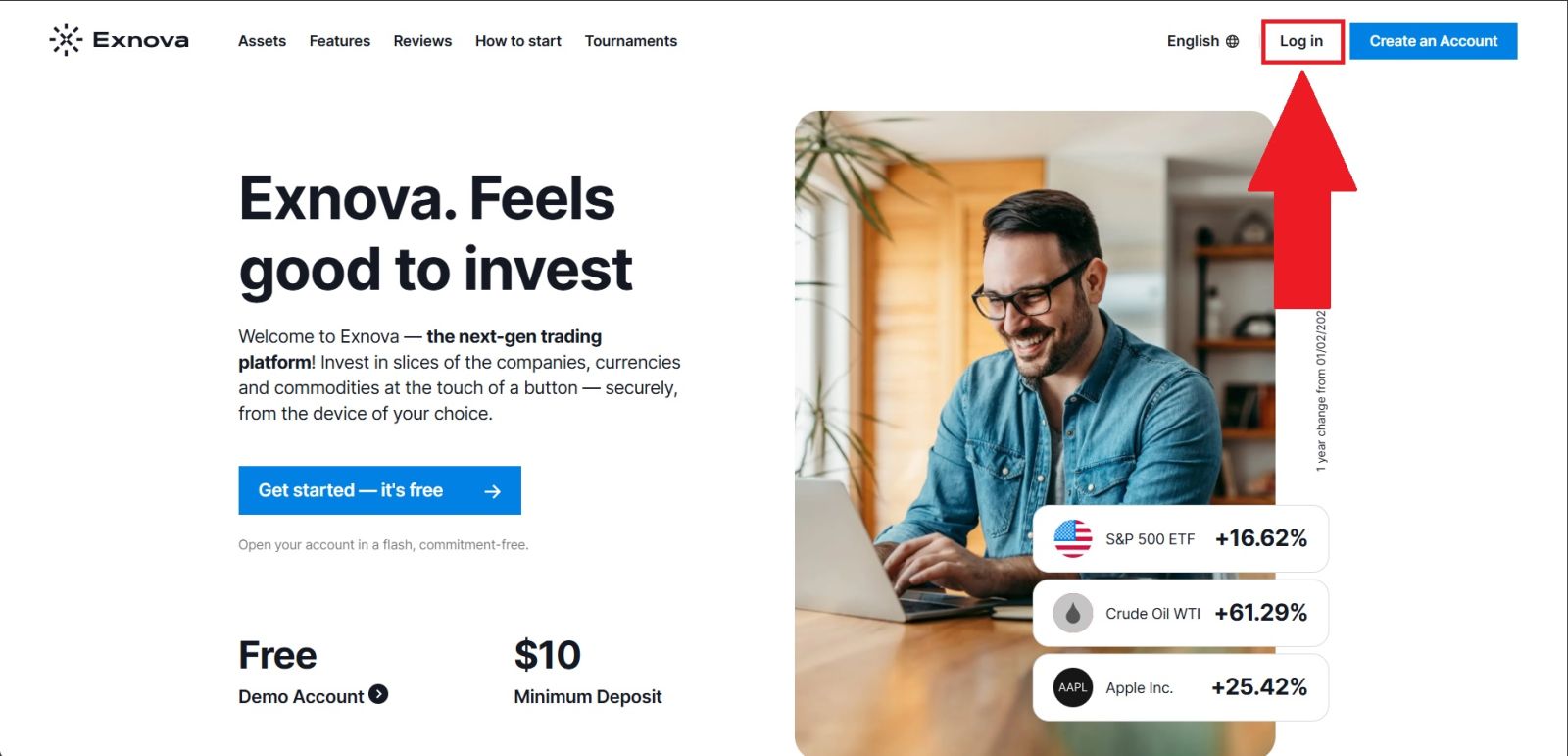
Head to the official Exnova website and log in using your registered email and password. Always confirm the URL is correct before entering any credentials to protect yourself from phishing attempts.
Once inside, you will land on your personal trading dashboard.
Actions to take:
- Open the official Exnova site in your browser.
- Confirm that the domain is correct.
- Click the [Log in] button on the homepage.
- Enter your account credentials to access your account.
Step 2: Navigate to the Deposit Section
After logging into your Exnova account, you will be taken to your main dashboard.
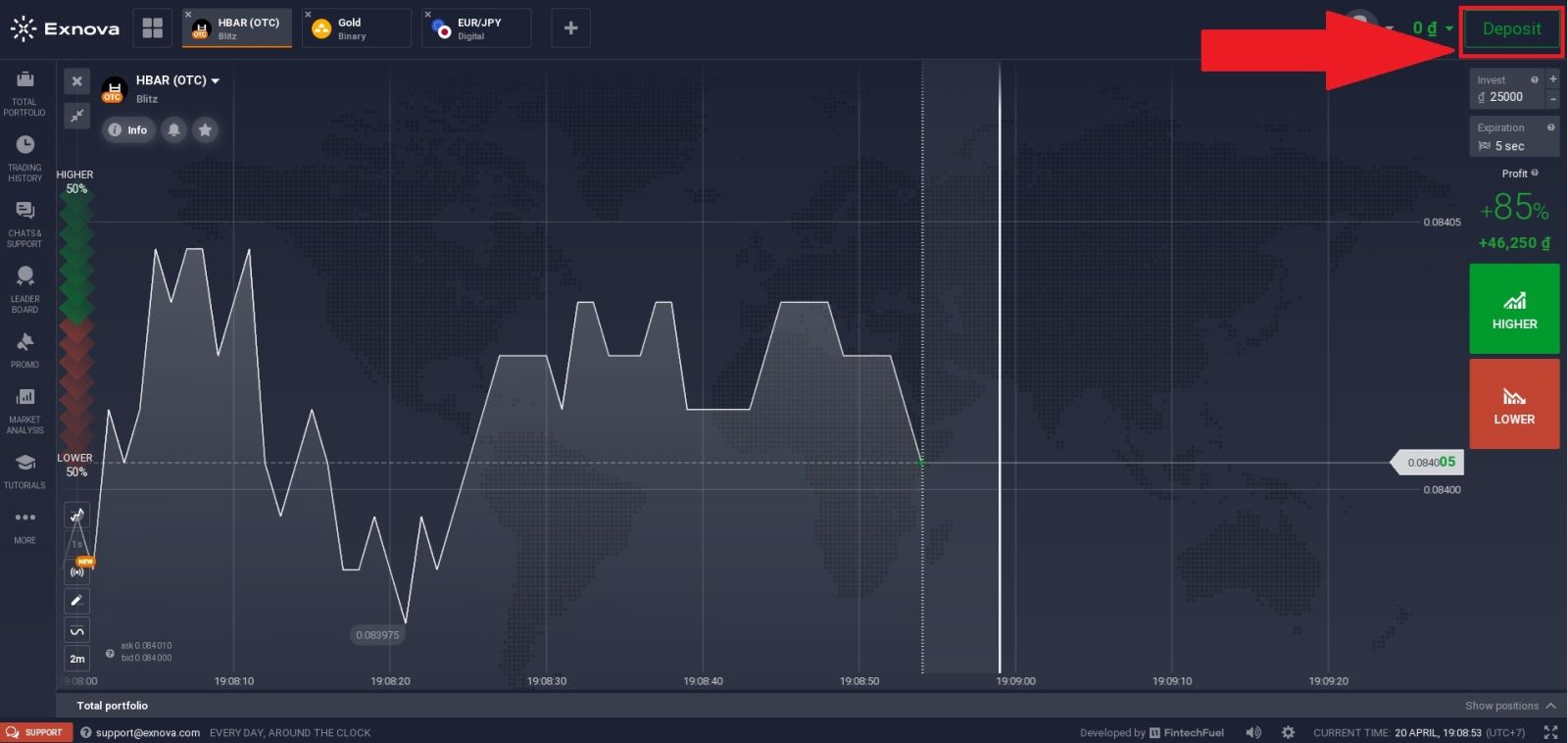
To add funds to your account, navigate to the Deposit section, usually located in the top-right area of the interface. From there, you can access the funding page, where all available payment options are displayed.
On this page, take a moment to explore the supported payment methods, review the minimum deposit requirements, and check the available currencies. This section is designed to help you manage all transactions related to funding your trading account quickly and securely.
Step 3: Select Your Deposit Method and Currency
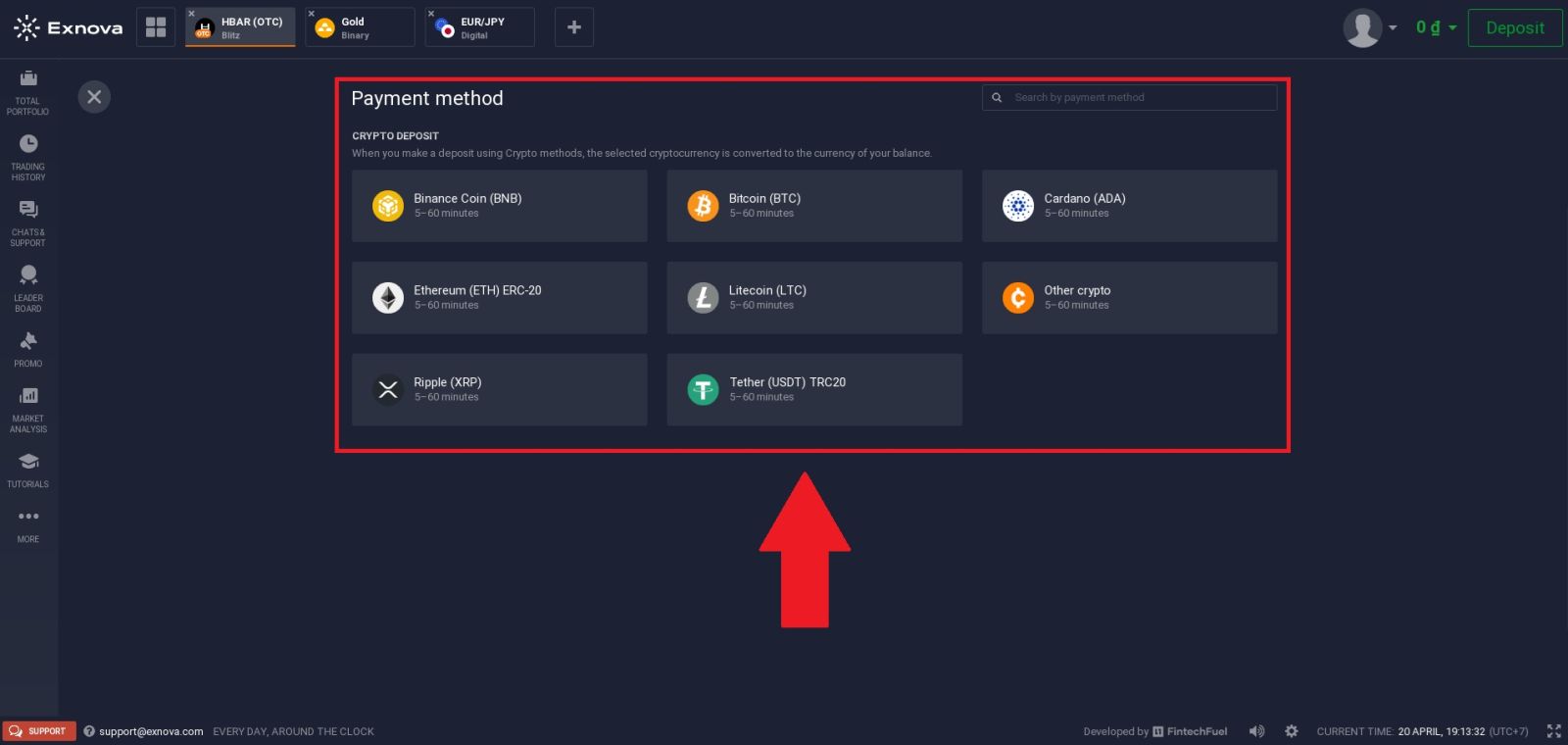
On the funding page of Exnova, you will see a variety of payment options, mainly focused on cryptocurrency deposits.
Browse through the available methods and choose the one that best fits your needs. Supported options include Bitcoin (BTC), Ethereum (ETH ERC-20), Litecoin (LTC), Ripple (XRP), Binance Coin (BNB), Cardano (ADA), and more.
For this example, we will select Tether (USDT TRC20), as it is a popular choice due to its fast transaction speed and low network fees.
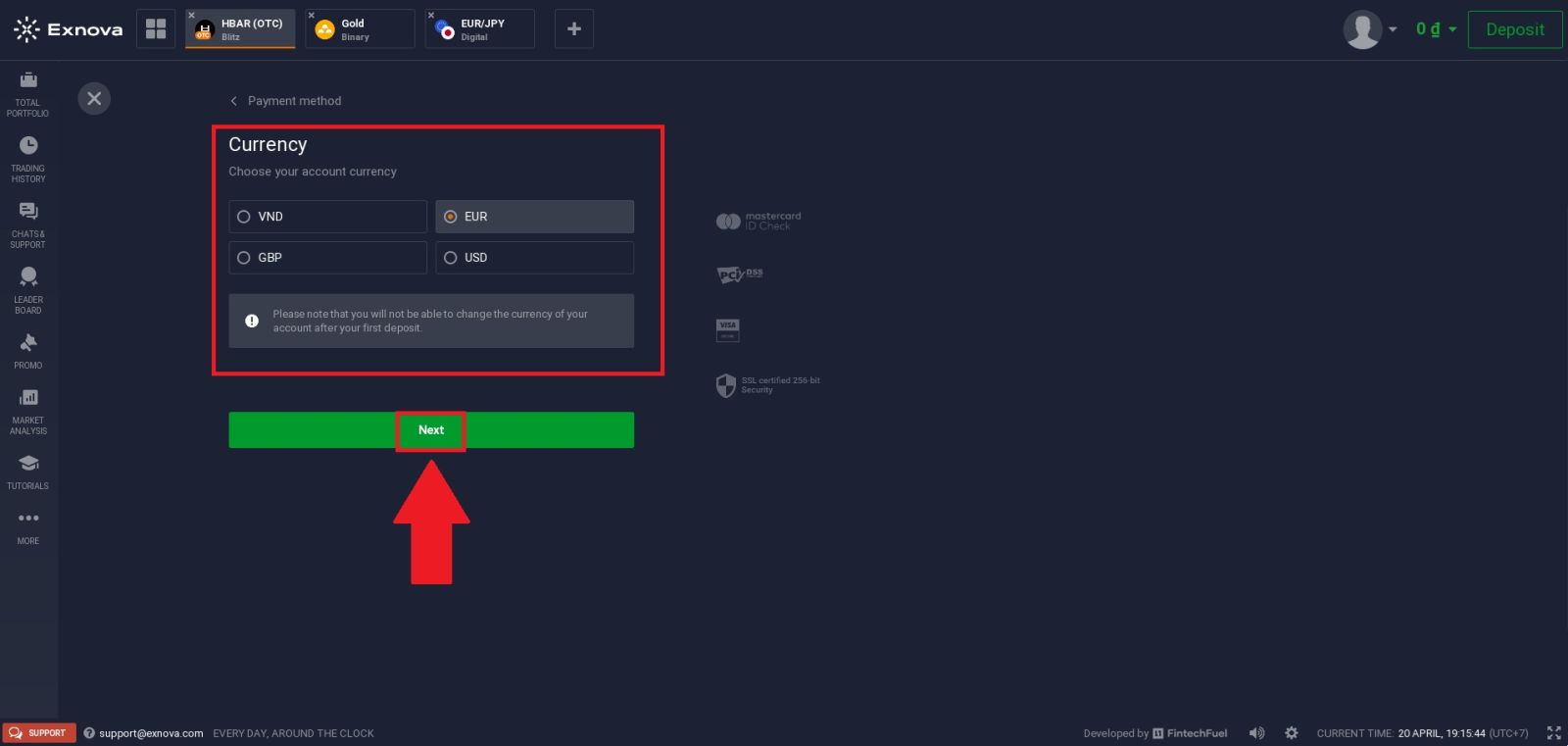
Next, choose your preferred currency and click "Next" to continue the process
Step 4: Enter Deposit Amount and Confirm Payment
After selecting, you will be taken to the deposit details page.
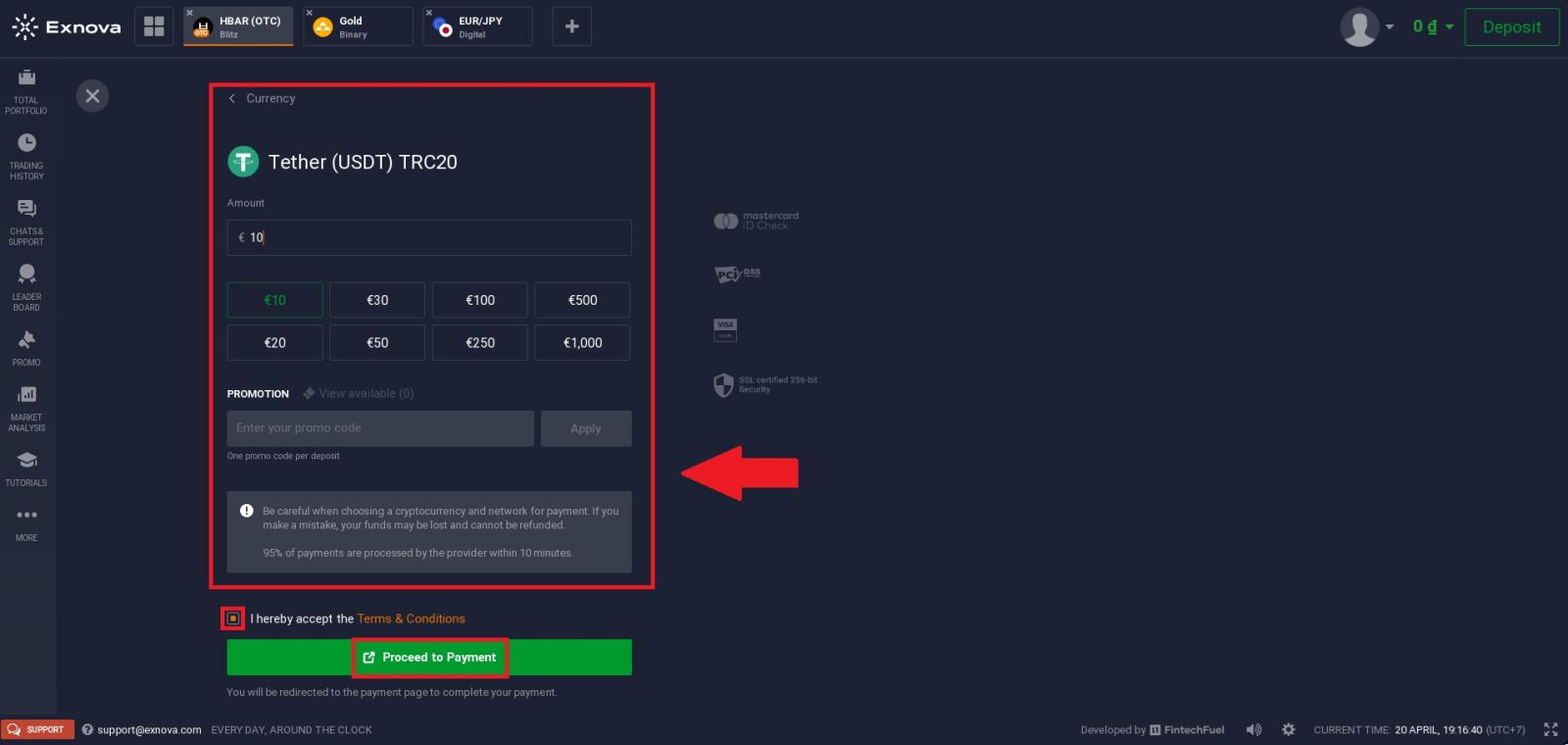
Here, you need to enter the amount you wish to deposit. You can either type a custom amount manually or choose from the preset options displayed (such as €10, €20, €50, €100, etc.) for quicker selection.
If you have a promo code, you can enter it in the provided field and click “Apply” to activate any available bonus.
Before proceeding, make sure to:
- Double-check the amount you entered
- Ensure you are using the correct network (TRC20)
- Review any notes or warnings related to crypto transactions
Next, tick the box to accept the Terms Conditions, then click the “Proceed to Payment” button.
You will then be redirected to the payment page, where you can complete the transaction by sending funds from your crypto wallet.
Step 5: Authorize the Payment
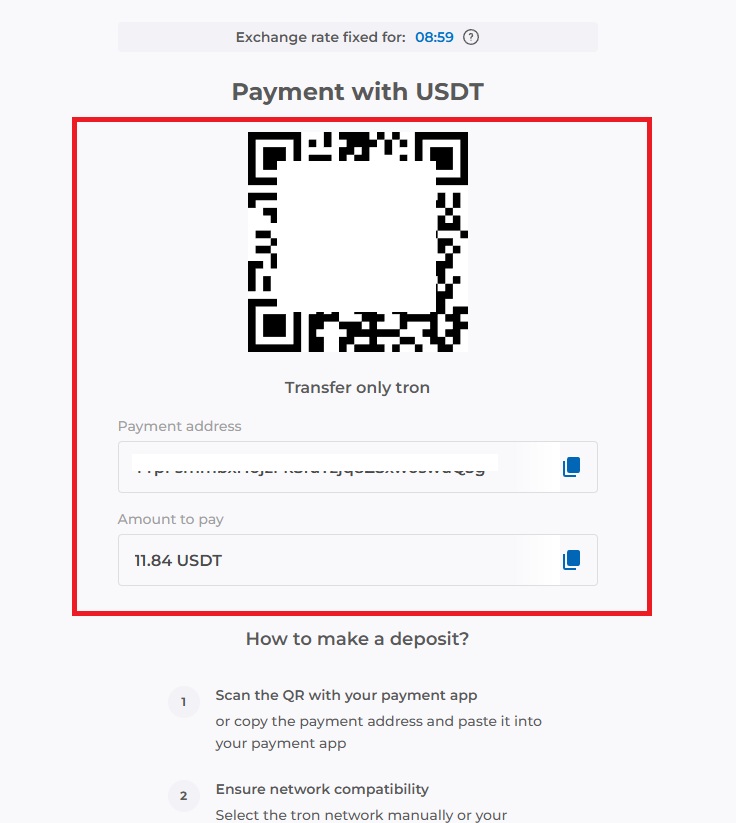
Continue processing your payment by copying the deposit details provided. Click the [Copy] icon to copy the wallet address or scan the QR code associated with the deposit address, then paste or use it on your external wallet or withdrawal platform.
Using this information, you can complete your deposit by finalizing and confirming the withdrawal from your external wallet or third-party account.
Once you’ve completed the deposit, you can view your wallet to check your updated balance.
Things Most People Don’t Know About Exnova Deposits
- Your live balance and demo balance are completely separate — depositing only adds to your real trading account
- Exnova itself generally does not charge deposit fees, but your payment provider might
- Cryptocurrency deposits are borderless and work regardless of your country
- Verifying your account before depositing prevents delays and unlocks higher deposit limits
- Some payment methods have processing cutoffs or maintenance windows — crypto is available 24/7
After Your Deposit — Next Steps
With funds in your account, here is what to do next:
1. Explore the platform Familiarise yourself with the trading interface, asset categories, and available timeframes before placing any trades.
2. Start small Begin with smaller trade amounts while you get comfortable with the platform mechanics, especially if you are new to binary options.
3. Use technical tools Exnova provides real-time charts and indicators. Take time to learn how to read them before committing larger amounts.
4. Know your withdrawal process Understanding how to withdraw funds is just as important as depositing. Make sure your account is fully verified so withdrawals go smoothly when you are ready.
👉 Trading guide for beginners: Exnova Trading Guide
👉 How to withdraw your funds: Exnova Withdraw Guide
Conclusion: Deposit Funds on Exnova Safely and Efficiently
Funding your Exnova account is a quick and straightforward process that allows you to start trading without delays. By selecting a suitable payment method and following the deposit steps carefully, you can ensure your funds are added securely and efficiently. Understanding any applicable fees and processing times helps you avoid issues and manage your transactions better.
With a reliable funding system in place, Exnova makes it easy to deposit money and focus on your trading experience with confidence.