Exnova Account Verification: How to Complete KYC Step by Step

In this guide, you’ll learn how to complete Exnova account verification step by step, what documents are required, and how to ensure a smooth approval process so you can trade confidently without restrictions.

Overview of Exnova Verification
Verifying your Exnova account is a required step to unlock full access to the platform, especially when it comes to deposits and withdrawals. While the process is usually simple, many users experience delays due to incorrect documents, incomplete information, or submission errors.
Understanding how verification works — and how to do it correctly — will help you avoid unnecessary waiting time and ensure your account is fully functional.
This guide explains the full Exnova KYC process, what documents are needed, how long approval takes, and how to fix common verification issues.
What Is Exnova Verification?
Exnova verification (KYC – Know Your Customer) is the process of confirming your identity to ensure account security and compliance.
This step is required to:
- Protect your account from unauthorized access
- Enable withdrawals without restrictions
- Comply with financial regulations
Without completing verification, some features may remain limited. If you have not created an account yet, start here: Exnova Registration Guide
What You Need to Prepare Before Verification Process
Before starting the verification process, make sure you have the following ready:
Identity document (Proof of Identity)
- Passport
- National ID
- Driver’s license
Your document must be clear, valid, and show your full name and date of birth.
Address document (Proof of Address)
- Bank statement
- Utility bill
- Official document with your address
Requirements:
- Must include your name and address
- Issued within the last few months
- Fully visible and not cropped
How to Verify Your Account on Exnova
#1 Navigate to the Official Exnova Homepage
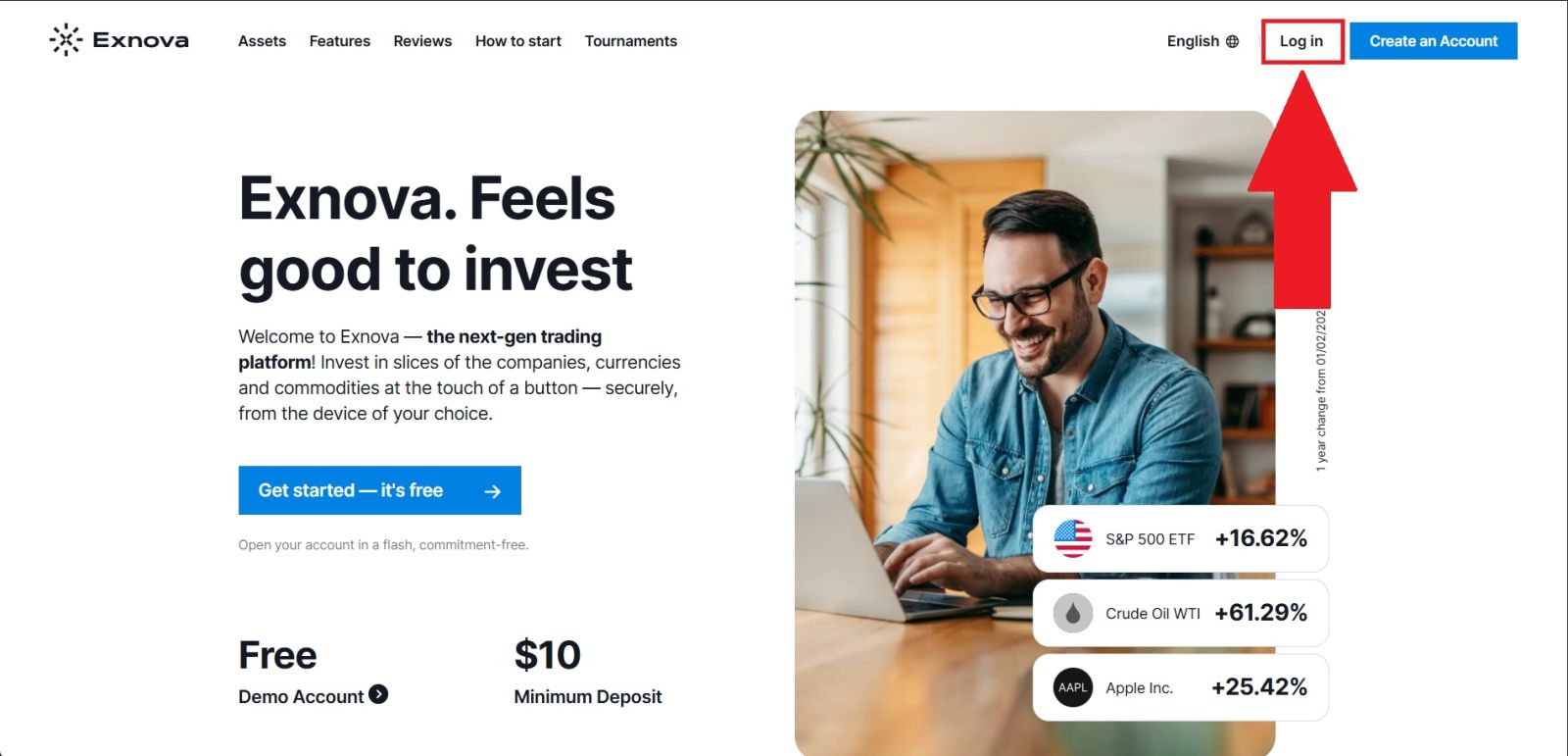
Begin by visiting the official website of Exnova and ensuring the domain is correct to protect yourself from phishing or fake sites. The platform offers a clean and user-friendly interface, making navigation simple and efficient.
Once on the homepage, click the [Log in] button to go to the login page, where you can enter your credentials and access your account.
#2 Access the Verification Section
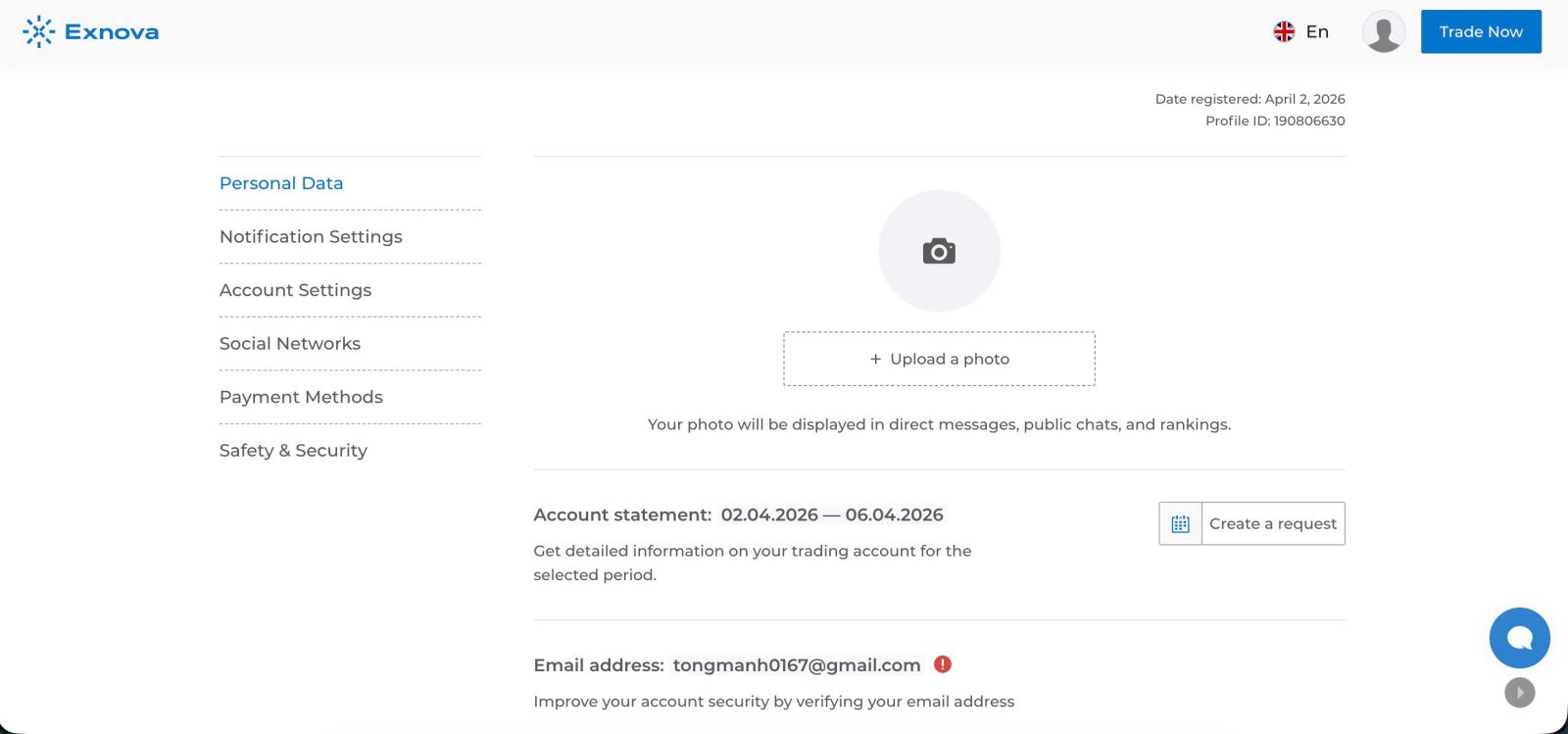
From the Personal Data section of your account on Exnova, scroll down to locate the “Verify” option. Once you find it, click the “Verify” button to proceed to the next step of the verification process.
This will direct you to the verification page, where you can begin submitting the required information and documents to complete your account verification.
#3 Verify your Email
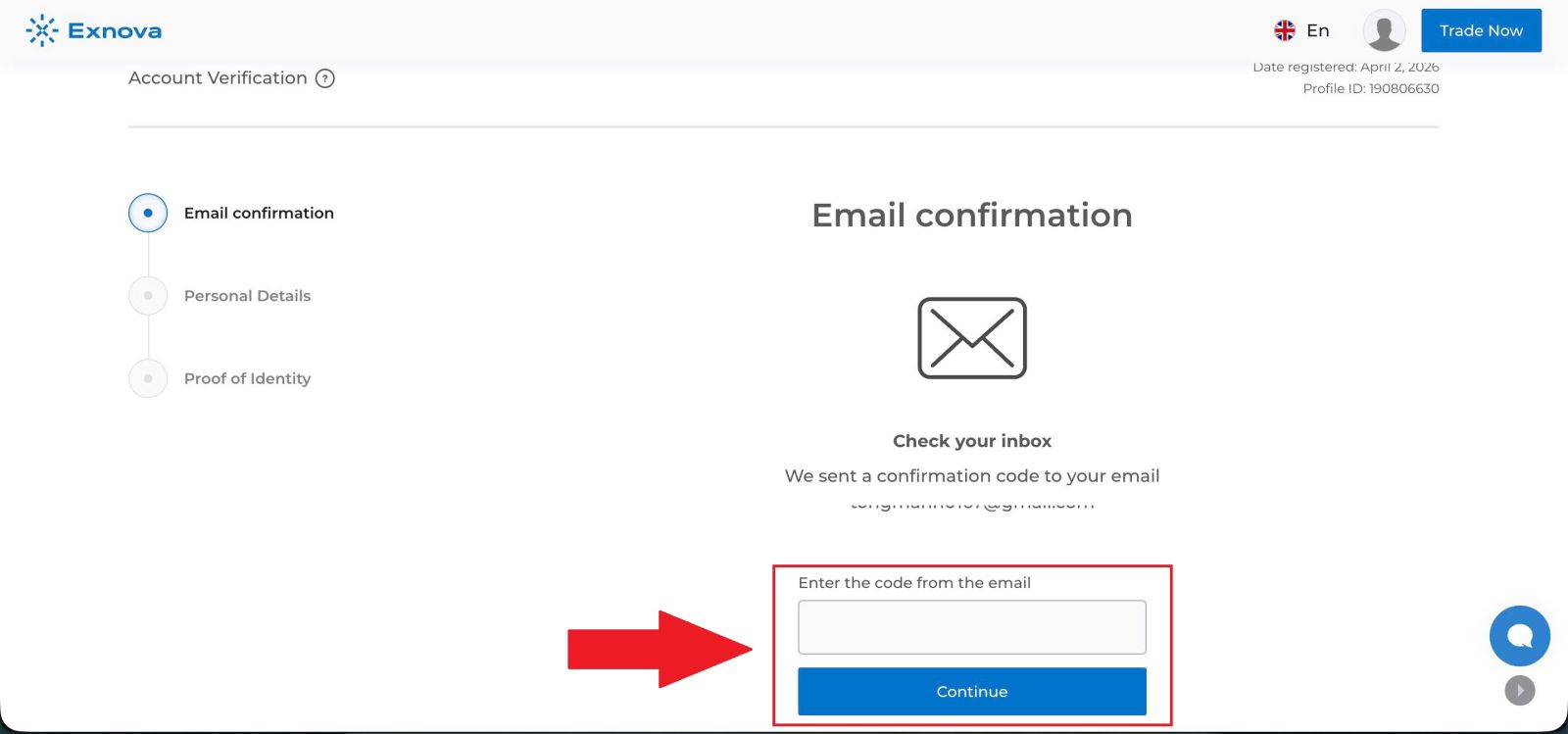
Enter the 6-digit verification code that has been sent to your registered email address into the required field to confirm your email. Make sure to input the code correctly and within the allowed time to successfully complete the email verification process and proceed with your account setup.
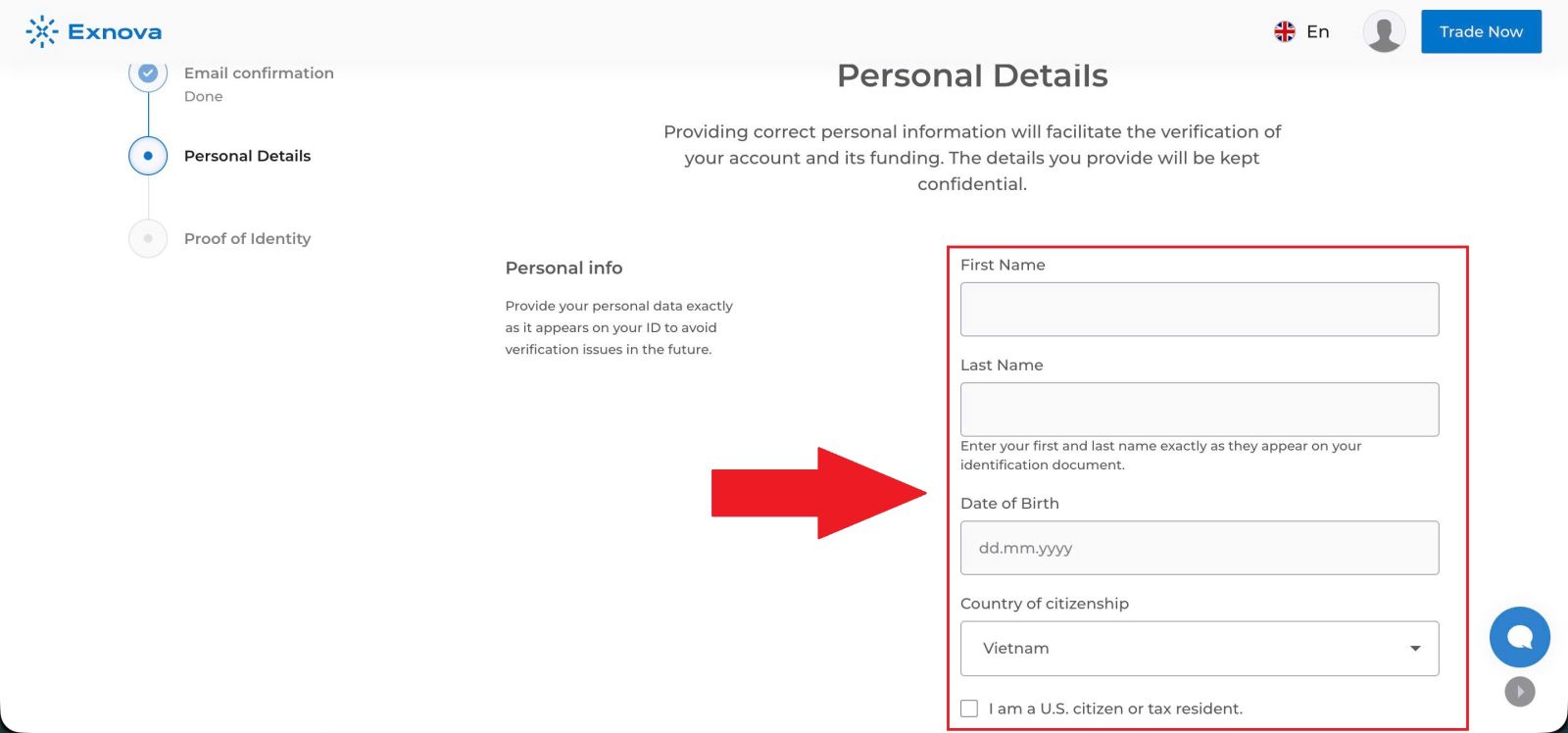
#4 Verify Your Profile Information
Go to the Profile Information verification section on Exnova. Enter all required personal details accurately, ensuring that the information matches your official documents.
Enter accurate details such as:
- Full name
- Date of birth
- Country of residence
Make sure all information matches your documents exactly.
Once completed, review your entries carefully and click [Submit] to proceed to the next step of the verification process.
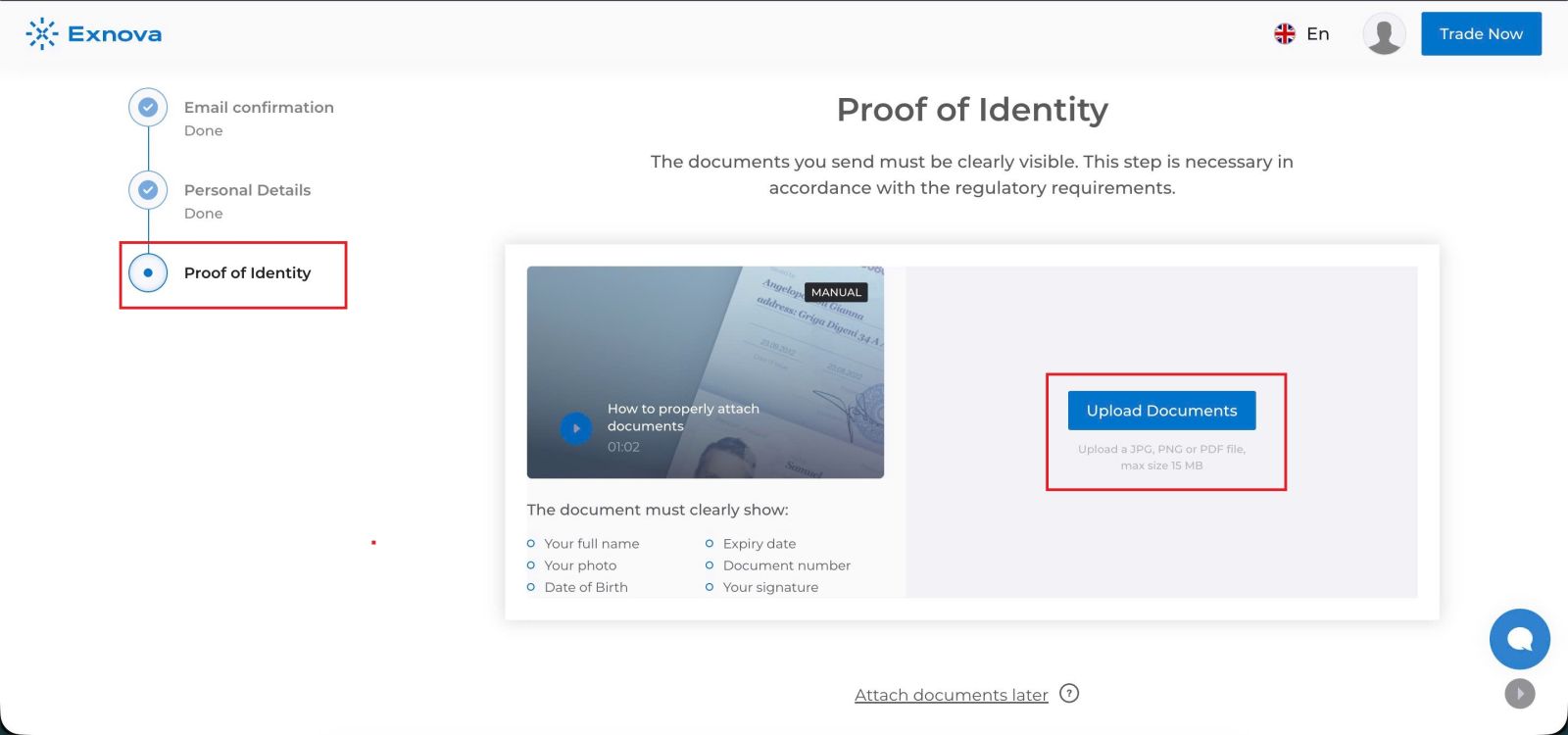
#5 Upload Your Documents
Click [Upload Documents] and choose the appropriate document type—such as a passport, driver’s license, or official government-issued ID card.
Ensure:
- Images are clear and high quality
- All details are visible
- No edits or cropped edges
Be sure to review the uploaded files to ensure they are legible, complete, and accurate. Once everything is in order, click [Submit document] to send your verification request. Exnova will then review your submitted documents and notify you once the verification process is complete.
#6 Exnova Verification Completed
After submitting all the required information and documents, your Exnova account will be verified once the review process is completed and approved.
You will receive a confirmation notification, and your account will gain full access to all platform features, including deposits, withdrawals, and live trading.
Common Verification Problems
Users often face these issues during KYC:
Document rejection
- Blurry images
- Expired documents
- Missing information
Delayed approval
- High system workload
- Additional checks required
Incorrect personal details
- Information does not match documents
Email or phone verification issues
- Not receiving confirmation codes
👉 These issues are common and can usually be fixed quickly by resubmitting correct information.
How to Fix Verification Issues
1. Upload better-quality documents
- Use clear, high-resolution images
- Avoid shadows or reflections
2. Double-check your information
Make sure your personal details match your documents exactly.
3. Resubmit if rejected
If verification fails, correct the issue and upload again.
4. Check email and spam folder
Verification notifications or codes may be sent there.
5. Contact support if needed
If delays persist, reach out to Exnova support for assistance.
Tips for Faster Approval
To speed up the process:
- Submit documents immediately after registration
- Use official and valid documents only
- Ensure all information is accurate
- Avoid multiple failed submissions
What Happens After Verification?
Once your account is approved:
- You can withdraw funds without restrictions
- Account limits may be increased
- Full platform features become available
RELATED EXNOVA GUIDES
To continue using Exnova effectively, the next helpful guides are:
- Exnova Login Guide
- Exnova Deposit Guide
- Exnova Withdrawal Guide
- Exnova Verification Guide
- Exnova Trading Guide
👉 Recommended Exnova flow:
Registration → Login → Verification → Deposit → Trading → Withdrawal
Conclusion: Complete Your Exnova Verification with Confidence
Verifying your Exnova account is an essential step to unlock full platform access and ensure secure trading. By following the KYC process carefully and submitting the required documents accurately, you can avoid delays and maintain smooth deposits and withdrawals.
A fully verified account enhances security, increases trust, and allows uninterrupted use of all features. Once your verification is complete, you can trade on Exnova with confidence and peace of mind.